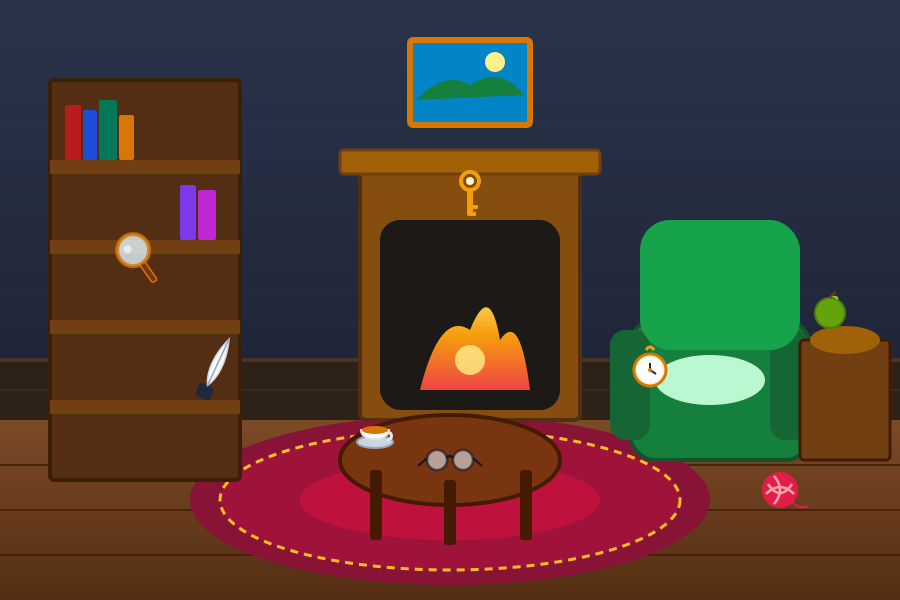
What is a Hidden Object Game?
A Hidden Object game is a classic genre of visual puzzle where players must carefully observe a rich, detailed picture to locate specific concealed items. Originally popularized through lavishly illustrated children's books and mystery computer adventures, hidden object puzzles test your ability to distinguish visual signals from background camouflage, pattern clutter, and intricate scenery.
In our modern browser edition, each scene is an original, hand-crafted vector illustration depicting charming environments ranging from a fireplace library to pirate coves and sunken underwater reefs. With three tailored difficulty settings—Easy (5 objects), Medium (7 objects), and Hard (8 objects)—the game offers a meditative, deeply relaxing experience where patience, methodical scanning, and keen visual acuity lead to satisfying discoveries. For players who enjoy pattern recognition, this visual search pairs wonderfully with the observation required in our Spot the Difference Free Online Game.
How to Play Free Hidden Object Online Game
Playing Free Hidden Object Online Game is intuitive and accessible for players of all ages:
- Choose Your Difficulty: Select Easy (5 items), Medium (7 items), or Hard (8 items) from the difficulty bar above the board. Easy is enabled by default for a relaxed initial playthrough.
- Review the Target List: Look at the cards displayed in the "Objects to Find" tray below the illustration. Each card displays an authentic miniature outline and object name.
- Scan the Scene Systematically: Examine the illustration carefully. Use the Zoom In/Out controls in the toolbar to inspect intricate sections or zoom out for the big picture.
- Click or Tap to Identify: When you spot a target item, click or tap directly on it. An illuminated green focus ring highlights the discovered item on the canvas, a reassuring checkmark appears, and the item card is marked off your list.
- Use Hints When Needed: If an object proves particularly elusive, click the Hint button to trigger a pulsing radar beacon directly over one undiscovered target.
- Unlock the Next Adventure: Finding all objects clears the level, records your victory, and unlocks the next exciting level with a new environment and new items to uncover!
Understanding the Difficulty Modes and Progress Tracking
Clear, responsive feedback ensures you always know your exact standing during gameplay:
- Easy Mode (5 Objects): Highlights the five most prominent items in each scene, perfect for beginners, younger players, or casual relaxation.
- Medium Mode (7 Objects): Introduces seven objects with moderate camouflage, requiring balanced focus and scanning.
- Hard Mode (8 Objects): Requires finding all eight hidden objects in the scene, testing the sharpest observation skills.
- Timer Tracking: Displays your elapsed puzzle time without stressful countdown limits or rush penalties.
- Found States: Discovered objects are marked with a green checkmark badge, dimmed text, and subtle strikethrough so you never waste time looking for an item you have already gathered.
- Duplicate Protection: Tapping an already found object will never trigger a false penalty or double-count progress.
Exploring the 10 Unique Themed Levels
Every single level in Free Hidden Object Online Game has been designed with its own distinct atmosphere, visual palette, and hand-placed objects:
- Level 1 – Cozy Living Room: Warm fireplace, armchair, bookshelf, and classic parlor keepsakes like a brass key, pocket watch, and teacup.
- Level 2 – Beautiful Garden: Sunlit stone fountain, floral flowerbeds, butterfly net, garden trowel, and blooming sunflowers.
- Level 3 – Busy Kitchen: A bustling culinary setting featuring copper pots, rolling pins, chef knives, and baking ingredients.
- Level 4 – Pirate Treasure Island: A tropical beach shipwreck with treasure chests, brass spyglasses, anchors, and pirate flintlocks.
- Level 5 – Magical Library: Soaring gothic bookshelves, crystal orbs, spellbooks, hourglasses, and mystical feather quills.
- Level 6 – Camping Adventure: Pine forest campsite with tents, crackling fire, camping lanterns, compasses, and wooden canoes.
- Level 7 – Old Town Market: Cobblestone marketplace stalls brimming with fresh apples, wicker baskets, scale balances, and bakery goods.
- Level 8 – Underwater World: A vibrant ocean coral reef filled with starfish, seashells, pearls, sunken amphoras, and diving masks.
- Level 9 – Enchanted Forest: Fairytale twilight woods with glowing mushrooms, crystal lanterns, hollow trees, and fairy dust bottles.
- Level 10 – Mysterious Castle: Majestic throne hall with suits of armor, royal goblets, heraldic shields, and jeweled crowns.
All progress is saved in your browser's local storage, meaning you can complete a few levels on your lunch break and return later to finish the remaining rooms without losing your unlocked status.
Effective Strategies for Finding Difficult Hidden Objects
If you find yourself searching for that elusive final item, try these time-tested observation methods:
- Grid Scanning: Divide the image mentally into quadrants (top-left, top-right, bottom-left, bottom-right). Scan each quadrant thoroughly before moving to the next rather than darting your eyes randomly across the entire image.
- Use Zoom Controls: Zoom into the scene at 130% or 150% to inspect cluttered background details like shelves, coral crevices, and forest leaves.
- Negative Space Inspection: Artists frequently place objects along structural boundaries—such as window frames, tree trunks, floor lines, or furniture edges. Look along contours where background meets foreground.
- Color Contrast Differentiation: Search specifically for colors that stand out from the ambient palette. If a room has predominantly warm browns and ambers, look for items that introduce cool teal, violet, or brass highlights.
- Silhouette Recognition: Focus on the geometric shape of the target rather than its full detail. A circular magnifying glass, triangular pendant, or long thin key stem often gives itself away by silhouette alone.
- Cross-Training Observation Skills: Switching between different puzzle types strengthens your cognitive flexibility. After locating objects in complex scenes, test your spatial tile deduction in Sliding Number Puzzle Game or exercise deductive logic with Picross Game Online.
Common Mistakes to Avoid
Keep these common pitfalls in mind to enhance your puzzle-solving satisfaction:
- Rapid Frantic Clicking: Tapping randomly across the screen rarely works and breaks the relaxing flow of the game. Take a deep breath and observe carefully.
- Overlooking Scale Variations: Objects are drawn in natural casual perspective. An item like a pocket compass or key might be slightly larger or smaller than you initially imagine.
- Fixating on One Item Too Long: If one object proves difficult to spot, shift your attention to a different item on the list. Finding other items declutters your mental map and often reveals the difficult item in peripheral vision.
- Ignoring Peripheral Corners: Players naturally gravitate toward the visual center of an illustration. Be sure to check the corners and outer edges of the scene.
Playing Seamlessly on Mobile and Desktop
Free Hidden Object Online Game has been built from the ground up for responsive performance across all modern devices:
- On Desktop: Enjoy wide-screen high-definition illustrations with comfortable mouse cursor precision, dedicated zoom controls, and an expansive view of both the artwork and target tray.
- On Mobile & Tablets: Illustrations automatically scale to your full device width without horizontal overflow. Generous touch-detection radii ensure accurate taps even on compact smartphone screens.
- Zero Downloads or Plug-ins: The game runs natively in HTML5, CSS, and SVG without heavy third-party app downloads or battery-draining frameworks.
Whether you have five minutes to spare while commuting or an evening to unwind at home, exploring the PuzzleFeels Games Directory delivers wholesome, ad-light mental recreation.
Cognitive Benefits of Visual Search Puzzles
Visual search games are more than just entertaining pastimes—they provide meaningful cognitive exercise. Searching for hidden items engages the visual cortex, trains selective attention, and strengthens visual working memory by requiring you to hold target shapes in mind while filtering out irrelevant background information. Pairing this visual workout with short-term recall drills like Memory Matching Game Online or strategic territory expansion in Color Flood Game offers a well-rounded mental workout.
Frequently Asked Questions
What is Free Hidden Object Online Game?
Free Hidden Object Online Game is a relaxing visual search puzzle where players examine detailed illustrated scenes to discover hidden items from a target list. Each level features an original themed illustration, adjustable difficulty modes, and unique objects to find.
How do Easy, Medium, and Hard difficulty modes work?
Easy mode challenges you to find 5 prominent objects per level—ideal for a quick or relaxing session. Medium mode increases the target list to 7 items with more cleverly concealed positions. Hard mode challenges you to find all 8 objects, requiring patient, meticulous observation.
How do I play each level?
Examine the list of objects shown below the scene. Look closely at the illustration to locate them. When you spot an item, click or tap directly on it. Discovered objects are highlighted on the picture and marked off your list. Find all objects to complete the level and unlock the next challenge!
How does the Hint feature work?
If you get stuck finding a particular item, click the "Hint" button in the toolbar. A glowing radar beacon will pulse directly over an undiscovered object in the scene, and its card in your target list will highlight to help you spot it quickly.
How do the Zoom In and Zoom Out controls work?
Click the Zoom icon in the toolbar to open the zoom popover. You can zoom in (+) up to 150%, zoom out (−) down to 70%, or click "Fit to Screen" (100%) to reset. Zooming scales only the playable scene, and object detection remains 100% aligned and accurate at every zoom level.
How does the timer work?
The timer tracks your elapsed puzzle-solving time in minutes and seconds (MM:SS). It automatically pauses when you click Pause and stops when you complete the level. There is no countdown limit or time penalty, so you can enjoy the puzzle at your own pace.
Can I mute or adjust the game sounds?
Yes! Click the speaker icon in the toolbar to toggle sound effects on or off. The game features soft, pleasant Web Audio chime effects for correct finds, gentle miss indicators, and celebratory completion fanfares. Your preference is automatically saved in your browser.
How many levels are available?
The game features exactly 10 distinct levels, each with its own original theme, hand-crafted illustration, and unique collection of hidden objects across all three difficulty modes.
Does the game save my progress if I close or refresh my browser?
Yes! Your highest unlocked level and completed stages are automatically saved in your browser’s local storage. When you return, you can immediately continue where you left off or replay any unlocked level.
Can I play this game on mobile devices and smartphones?
Yes! The game is fully responsive for all screen sizes. Touch interactions are optimized for mobile phones and tablets, with clean scaling, tap-friendly detection areas, and no horizontal scrolling.
What happens if I click an incorrect spot?
An incorrect click displays a gentle, temporary ripple and a brief message ("Not quite! Keep looking.") to confirm your touch was registered. There are no penalties, score deductions, or game-over states.
Can the same object be counted or clicked more than once?
No. Once a hidden object is discovered, it is marked with an illuminated checkmark ring and locked. Further clicks on that spot will not trigger duplicate completions or inflate your progress.